Author: Wolfamri

  • Macro Studio Update 2026.11.20

    Big change coming in release 2026.11.20, so I have updated Lesson 3 of the Macro Studio Masterclass.

    Watch Your Stack Being Built

    Some people preferred Helicon Focus due to the animation that shows the stack being built. While I never understood that as I was happily working on something else while Macro Studio did the work for me in autostack, people seem to like that function, so Ryan added it.

    The new update to Macro studio shows a colorful animatin while the stack is being built

    Autostack Workflow Improvements

    • Select multiple folders
    • Select specific images only instead of folders
    • Tiff is now a possible output format (I wouldn’t recommend it though)
    • We now have a new, cleaner Autostack dialog
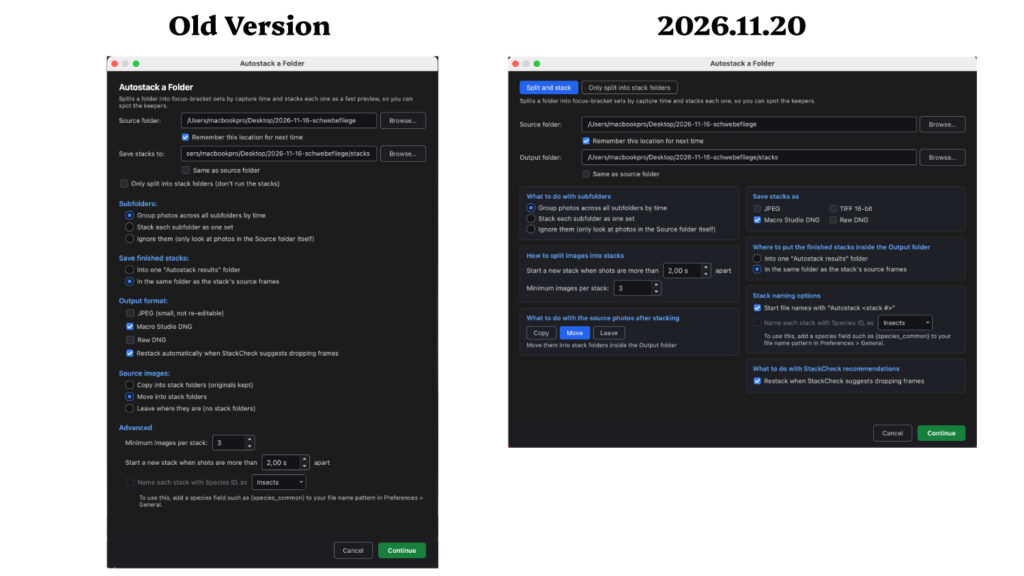
    Old and new autostack dialog in macro studio

    StackScore Gets More Picky

    In the past it was quite easy to max out StackScore and let’s face it – always 100 gets boring over time. Stacks with moving subjects get a lower score from now on. Great for everyone of us who have that sports spirit.

    Send Images for Feedback Runs in Background

    In the past you had to wait until the images were sent. That’ why some people refrained to use it, particularly in areas with bad reception. Now it runs in the background, so let me recommend to use it more often to help Ryan improve the stacking results more and more.

    Several smaller improvements

    Check out the exact notes here: Macro Studio release note 2026.11.20


  • Macro Tool Comparison Video

    Did you ever ask yourself whether a Raynox DCR250 or extension tubes will give you more magnification for macro photography?

    Or is there an even better solution?

    In this video I compare the two above mentioned options to a regular macro lens or a very affordable reverse mount to get a stunning magnification of 11:1.


  • Hoverfly Macro Stacking Test

    I didn’t expect that, as it is mid November and relatively cold, but I went out to take a break from computer work and suddenly saw a hoverfly sitting on a leaf.

    I ran into the house to get the camera and a tripod because I long wanted to test the same stack with different aperture settings on a life insect.

    I changed ISO and/or flash power by the same amount of stops that I changed the aperture to compensate for the different lighting.

    Here’s the result I got from Macro Studio without any retouching.


    Uncropped image


    Cropped to 1500px width

    I will later discuss that in a separate video, but just thought you might be interested.

    The f/11 created a cleaner stack, which is exactly what I teach in my course. You don’t want the aperture that gives you the sharpest image, but the one that gives you the best stack.

    Weirdly none of the stacks is really perfect, despite using a tripod, and the hoverfly not moving.

    I also tried to stack in Zerene Stacker, Helicon Focus and Affinity. Neither created a better result.

    Here are the camera settings for the two shots:

    Left image

    📷 | OM Digital Solutions OM-1 | OM 90mm F3.5
    ⚙️ | 1/100sec | f/11 | 400
    👁️ | 100 frames | step size 3

    Right image

    📷 | OM Digital Solutions OM-1 | OM 90mm F3.5
    ⚙️ | 1/100sec | f/5.6 | 200
    👁️ | 184 frames | step size 3


  • Macro Studio Update 2026.11.15

    Hoooorayyyy, we have an eraser brush!!!!

    An eraser brush was added to macro studio

    I lately sent Ryan Cush a video about my retouching workflow in Macro Studio and showed him why I desperately needed an eraser brush in both Spot Correct and Retouch.

    Luckily I haven’t published my Macro Studio Masterclass yet, so I can change my course videos to reflect the changes.

    You can check out the changes here: Release Note 2026.11.15

    Once the course is I will post videos here that will show the more important updates in action.


  • Macro Studio Update 2026.11.10

    Ryan Cush just posted an update to Macro Studio.

    This week there are just smaller changes. However, one I’m particularly happy about is this note:

    In Spot Correct’s Clone mode, holding Alt shows the source crosshair right away

    Alt-click to select a stamp source in macro studio

    That was one of my feature requests. In the past when you hit the alt/option key to pick your source in clone mode, the mouse cursor wouldn’t change. That always confused me as I didn’t know whether it was actually picking the source or not.


    You can view the release notes here: Macro Studio Release Note 2026.11.10